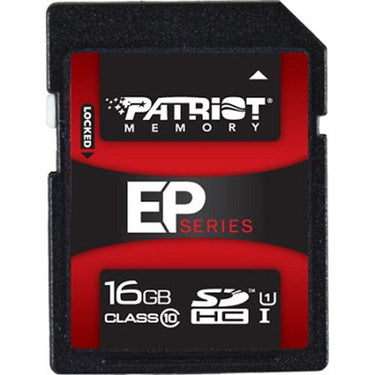
When selecting storage solutions for your devices, SD memory cards stand out as a top choice. They offer numerous benefits that make them a reliable and convenient option for storing and transferring data. Whether you need additional storage for your camera, smartphone, or other electronic devices, SD cards are the perfect fit.
One of the primary advantages of SD memory cards is their versatility. They are compatible with a large selection of devices, including digital cameras, camcorders, smartphones, tablets, and even laptops, making them a popular choice for both professionals and everyday users.
SD memory cards come in various types, such as SDHC (Secure Digital High Capacity) and SDXC (Secure Digital Extended Capacity). SDHC cards typically offer storage ranging from 4GB to 32GB, while SDXC cards can provide capacities up to 2TB. These options allow you to select the right memory card based on your specific storage requirements.
Choosing the appropriate SD memory card for your device is crucial to ensure optimal performance and compatibility. Consider factors such as storage capacity, speed class, and brand reputation. Higher storage capacities are ideal for large files like high-resolution photos and videos. The speed class determines how quickly data can be written to and read from the card, so finding a card with a suitable class is essential for your device's needs.
Beach Camera offers a wide selection of SD memory cards from top brands like SanDisk and Lexar. With our extensive range, you can find the right SD card to meet your storage needs. Shop confidently, knowing you're getting a high-quality product that delivers exceptional performance.
Best Practices for Using SD Memory Cards
For the best performance and extended lifespan of your SD memory cards, it's crucial to adhere to recommended usage practices. Consider these guidelines to maximize the efficiency of your SD cards:
· Safely insert and remove SD memory cards: Handle your SD cards with caution to avoid damage. Always turn off your device before inserting or removing the card. Insert the card smoothly into the slot until it clicks. For removal, press it gently until it releases, then extract it carefully.
· Optimize storage space: Enhance the storage efficiency of your SD card by eliminating unnecessary files or apps. Regularly transfer data to your computer or cloud to free up space. Additionally, format your card occasionally to maintain optimal performance.
· Secure your data: Protect against data loss by scanning your card with trustworthy antivirus software. Always eject the card correctly from your device to prevent data corruption. Make regular backups of your data to safeguard it against unexpected problems.
Following these guidelines will help your SD memory cards function at their best and keep your data protected. At Beach Camera, we offer a diverse selection of premium SD memory cards to meet your storage requirements. Explore our collection today and notice the difference!
SD Memory Card Maintenance
Taking care of your SD memory cards is crucial for extending their life and ensuring they work efficiently. Consider these key practices to keep your SD cards in top shape:
· Cleaning and handling: Refrain from touching the card's metal contacts to prevent damage from fingerprints, dust, or moisture. Use a soft, lint-free cloth for cleaning, and steer clear of harsh chemicals or abrasive substances.
· Formatting and organizing data: Format your SD cards periodically to enhance performance and reduce the risk of data corruption. Ensure you back up important data before formatting. To begin, insert the card into your device and access the settings menu. Follow the on-screen instructions to complete the process. Organize your files by creating folders and sorting them by type, date, or other categories.
· Troubleshooting common issues: If you experience problems with your SD card, try it in another device. If the problem continues, format the card or get in touch with the manufacturer for support. Make sure your device’s firmware and drivers are current, as outdated software can lead to compatibility problems.
Adhering to these care guidelines will help you extend the lifespan of your SD cards and maintain their performance. Always check the manufacturer's instructions for specific maintenance advice for your SD card model.
Customer First
We put customers first, always.
Give Us A Call
(800) 572-3224
Fast Free Shipping
On everything.
Secure Transactions
Transactions backed by 40+ years of trust.
✓
You're on the list!
We'll email you when this item is back in stock.
Notify me when available
Enter your email and we'll let you know when this item is back in stock.