


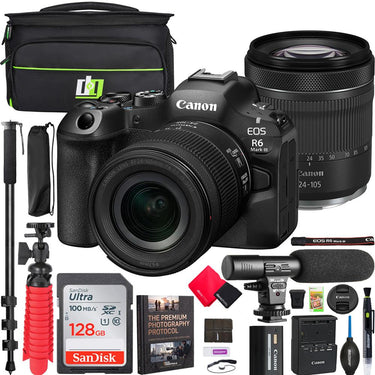
Canon EOS R6 Mark III Mirrorless Camera with RF 24-105mm F4-7.1 IS STM Lens Kit Bundle
- 32.5MP full-frame sensor + DIGIC X
- Up to 40 fps with 20-frame pre-shoot
- IBIS: 8.5 stops center, 7.5 periphery
- Dual Pixel AF II: people, animal, vehicle
- Dual slots: CFexpress Type B + UHS-II SD
- Canon 1 Year Limited Warranty
 Canon EOS R6 Mark III Mirrorless Camera with RF 24-105mm F4-7.1 IS STM Lens Kit Bundle
Price unavailable
Canon EOS R6 Mark III Mirrorless Camera with RF 24-105mm F4-7.1 IS STM Lens Kit Bundle
Price unavailable

Pickup currently unavailable at 80 Carter Drive
Your payment information is processed securely. We do not store credit card details nor have access to your credit card information.
What's In The Box
- CAMERA INCLUDES:
- Canon EOS R6 Mark III Mirrorless Camera Body 7084C018
- Canon RF 24-105mm F4-7.1 IS STM Lens
- Battery Pack LP-E6P
- Battery Charger LC-E6
- E-67 II Lens Cap
- Lens Dust Cap RF
- Shoe Cover
- Camera Cover R-F-5
- Strap ER-EOSR6 Mark III
- Battery Pack Cover
- Canon USA Authorized Dealer Warranty
- BUNDLE INCLUDES:
- Deco Gear Photo and Video Photography Travel Case for Cameras Lenses and Accessories
- Mini Condenser Shotgun Microphone UM-MIC100
- 72" Adjustable Professional Full Size Monopod with Case
- 12" Tabletop Vlogging Tripod/Handheld Grip 2 in 1
- Sandisk Ultra SDHC Memory Card 128GB 100MB/s(R) Gray
- Deco Essentials Premium Photography Protocol Ebook Digital Download Guide
- Pro Lens Dust Blower
- Lens/Sensor Brush Pen
- LCD Screen Protectors
- Pack of 2 Microfiber Cloths
- Lens Cap Keeper
- SD Memory Card Reader
- SD Memory Card Storage Case
Free Shipping
Free ground shipping is available to home addresses in the contiguous United States. PO Boxes, Alaska, Hawaii, US Territories (including Puerto Rico), APO/FPO and addresses outside the United States are not eligible for free shipping.
FedEx Shipping
All merchandise except for oversized items (e.g. Flat screen LED TVs over 55" and plasma TVs over 51") advertised on Beachcamera.com are usually shipped via FedEx.
All packages shipped from Beachcamera.com require a signature upon delivery. Please arrange for someone to sign for the delivery if you are unable to do so. We recommend that you provide an email address so that we may keep you informed of the status of your order and send you tracking information. You will be able to track your order online or by phone for an estimated time of arrival. FedEx will attempt to deliver your package three times before returning it to Beachcamera.com
United States Postal Service (USPS) Shipping
Small items such as memory cards may be shipped by the Post Office.
If the destination address is a PO Box or an APO/FPO, we will ship your order via USPS since FedEx is unable to deliver to those destinations. We will provide tracking information via email after your order has shipped. Items delivered to a PO Box or an APO/FPO will be delivered in 7 - 10 business days. Final delivery for APO/FPO destinations will be subject to the Terms and Conditions of the APO/FPO services. Not all items can be shipped via USPS. Some items that are shipped via USPS may be subject to an additional shipping charge. If necessary, Beachcamera.com will contact you before the order is processed.
Oversized Merchandise Shipping
Oversized merchandise (Flat screen LED TVs over 55", plasma TVs over 51", BBQ Grills & Furniture) are shipped via a motor freight carrier that specializes in Home Delivery. Since these items are large and fragile, special handling is required, and cannot be shipped via our standard shipping options.
We take every precaution during our shipping preparation process to ensure that your order arrives to you in perfect condition. Each item on your order is scanned for accuracy of model and serial number. We apply large orange fragile sticker labels to notify the carrier that your shipment is fragile and requires special handling. The labels also include important step-by-step instructions on how to inspect and sign for your shipment. In addition to the manufacturer's standard foam and corrugated packaging, we also apply a special shock absorption polyethylene material to the outer carton of every TV. This safeguard will disperse energy from impact during transit, and eliminate damage to the product itself. Our professional appointment-based delivery service allows you to open and inspect your new TV prior to signing and accepting the TV. When you purchase a TV at Beachcamera.com, you can be sure that it will arrive perfect working order, and will remain that way for a long time to come.
Non-Deliverable Addresses
We are unable to delivery to the following addresses:
- Mail box drop off locations
- Hotels and motels
- Trade Shows, Conventions, Conferences
Standard Return Policy
We want you to love the items you purchase from Beachcamera.com. If you are not satisfied with your purchase for any reason, you may return items for a full refund within 45 days, subject to the conditions below.
- Returned merchandise must be in original condition and include all factory packed accessories and paperwork (e.g. battery, charger, cords, straps, unmarked warranty card, manuals, etc.), in the original manufacturer box and packaging with UPC, barcode, and serial number intact.
- Incomplete returns will receive a reduced credit, reflecting any missing peripherals.
- The product serial number must match the serial number in our database. Beachcamera.com maintains serial number tracking.
- We require that all approved returns of computers, tablets, and similar devices have the password removed or restored to the system default.
- Return merchandise must be double-boxed with no writing on the manufacturer's box. Your Return Authorization number should be prominently displayed on the outside of the shipping box.
You must contact our customer service department to arrange a return. All returns must be shipped to the following address:
BTC Beach Camera Returns
80 Carter Drive
Edison, NJ 08817
You must include the RA number issued to you by customer service, please be sure to write this number clearly on the return box.
Please be sure to save the shipment tracking number for your return. Merchandise lost or damaged during shipping is the shipper's responsibility.
Televisions over 65" must be returned via one of our Home Delivery Partners. Please contact us to schedule a pickup for your large TV return.
If your return is not the result of our error, the return shipping costs are the responsibility of the customer.
Television Returns
Buyer's Remorse for TVs in Brand New condition:
If you are not 100% satisfied with your TV purchase, you may return it within 30 days from delivery for a full refund, less return shipping fees. Please note that a 15% restocking fee may apply. All returned TVs must be in their original box and include all packing material, manuals, and accessories.
Damages:
We're here to help!
For Common Deliveries (FedEx, UPS):
Please inspect the TV and report any damages (e.g. cracked screen, scratches, dents, etc.) within 2 days by contacting us at 1.800.572.3224
For Special Handling/Freight deliveries:
Please open and inspect the TV prior to signing for it. If the TV is cracked or damaged, please refuse delivery and contact us immediately at 1.800.572.3224 .
Please note damage claims will be denied for the following:
- TVs with over 60 minutes of recorded usage
- TVs that have been moved from the original delivery address
All damage claims must be made within two (2) days of delivery. We will issue a refund and cover all shipping costs.
Manufacturer Defects:
Your TV is fully covered under your in-home one year Manufacturer's Warranty service. If any further assistance is needed, please contact us. *Open-Box units are covered under our in-house 90 day warranty.
Drones Returns
All defects can be handled under the manufacturer's warranty. For DJI brand drones, call DJI at 818-235-0789 and obtain a case number for the defect prior to requesting an RMA. Please note only Dead on Arrival units out of the box will be returnable to us (with a valid case number). DJI will NOT authorize any returns to us if there are any signs of use like dirt, grass stains, nicks or any signs of use. For these situations, the Return Authorization would need to be handled directly between the customer & DJI
Exceptions
- Mattresses
- Opened or Downloadable Software
- Consumables, including batteries, paper and ink
- Opened packages of Apparel, Bedding or Linens
- Used Cookwear and BBQ Grills
- Personal Body Massagers/Shavers
- Special order items
- Refunds
Refunds for returns are applied to the payment method used at the time of purchase. Once we receive and inspect the product we will credit your account. Please allow 5-7 business days for a credit to appear on your account.
Product Exchanges
If you purchased a product from Beachcamera.com that you wish to exchange for an alternative, you can return the item for a full refund and simply place a new order for the item you desire. A refund credit cannot be applied to a new purchase.
Defective Items
An item that was discovered to be defective upon receipt can be replaced or returned for a full refund.
Damage or Missing Items
Claims for items damaged in transit or missing items must be received within two business days of receipt of the shipment.
Replacement
We will send a product replacement after the authorized return has completed our receiving/inspection process. The replacement will ship within four business days following the receipt of your return. Please allow for additional processing time after holidays.
Although it is our goal to ship a replacement as quickly as possible, a replacement cannot be shipped before we receive and inspect the return. To receive a replacement more quickly, you may place a new order for the same item (shipping not included) and we will issue a refund for the full value of the returned product (including shipping) upon completion of our return process.
Product Details
Canon EOS R6 Mark III
The EOS R6 Mark III camera is built to meet your demands and deliver stunning results. Capture 32.5MP stills with impressive detail at up to 40 fps and enjoy the comfort of pre-continuous shooting to aid you during those unpredictable moments. With Canon Log 2 color, 4K 120p slow motion, high-quality oversampled 4K 60p, 7K RAW recording at 60p, and 7K 30p Open Gate recording for postproduction versatility, this is a hybrid camera you’ve been waiting for.
Product Highlight
32.5MP full-frame CMOS Image Sensor, DIGIC X Image Processor.
Up to 40-fps Photo Shooting with 20-frames of pre-continuous shooting.
In-Body Image Stabilizer: up to 8.5 stops (center), and 7.5 stops (periphery) Coordinated Control IS shake correction.
Dual Card slots - (1) CFexpress Type B card, and (1) UHS II SD card.
Internally recorded 7K video at up to 59.94p in 12-bit Canon RAW Light Movie.
Open Gate recording at up to 7K 29.97p in 10-bit MP4 or 12-bit RAW.
High-speed recording at up to 4K 119.8p, or DCI 2K/Full-HD 179.8p with audio, and S&F mode.
Canon Log 2 video with up to 15+ stops of dynamic range, Canon Log 3, HLG, PQ.
Waveform, False Color and Zebra exposure aids. Improvements while recording video.
Product Feature
High Image Quality Featuring a 32.5MP Canon Developed and Designed Full-Frame CMOS Image Sensor
The EOS R6 Mark III camera is a full-frame digital mirrorless camera featuring a 32.5MP Canon-developed and designed CMOS Image Sensor. With a 34% increase in resolution compared to the EOS R6 Mark II, and a 61% increase in resolution when compared to the original EOS R6 image sensor, more resolution, cropping capability and print resolution await.
DIGIC X Image Processor
Powered by the DIGIC X Image Processor, enjoy high-performance operation with Dual Pixel CMOS AF II, Coordinated Stabilization with Optical and In-Body Image Stabilization, high-quality image processing, and high-resolution video functionality.
Up to 40-fps Photo Shooting and with 20-Frames of Pre-Continuous Shooting and Equipped with Mechanical, First Curtain Electronic, Fully Electronic Shutter Modes.
Up to 40 Frames Per Second Photo Shooting
Capturing “the moment” of maximum action is critical and can be extremely difficult even for top professional photographers trying to capture imagery of unpredictable subjects – so the EOS R6 Mark III camera features up-to 40-frames per second continuous drive shooting when set to the H+ drive mode in Electronic Shutter.
20 Frames of Pre-Continuous Shooting
With Pre-continuous shooting enabled, an additional 20-frames are captured before you fully press the shutter button, allowing for even more versatility, and enabling new shooting workflows to ensure elusive and unpredictable subjects can be precisely captured up to half of a second before your reaction.
In-Body Image Stabilizer with up to 8.5 stops of shake correction effect (center) and 7.5 stops at periphery
When capturing photos at lower shutter speeds, the In-Body Image Stabilizer system provides up to 8.5 stops of shake correction at the center and up to 7.5 stops at the periphery. This is crucial for non-image stabilized lenses, but also effective for optically image stabilized lenses with Coordinated Image Stabilization (In-Body + Lens optical stabilization).
Dual Pixel CMOS AF II with People, Animal, Vehicle Detection, and Register People Priority
High-performance Subject Detection featuring People, Animals, and Vehicles detection, the EOS R6 Mark III camera provides impressive subject detection, and tracking capability for incredible precision and convenience.
Register People Priority
New to the 6-series is Register People Priority. Simply photograph a person and register them in-camera to prioritize them over other people in the scene. Up to 10 registered people can be set, and up to 10 registered people can be saved to each card.
Autofocus — More Pro than Ever
The EOS R6 Mark III camera offers many of the same AF features as Canon’s powerful EOS R5 Mark II and EOS R1 cameras.
It features four additional AF area options, displayed with a small lock icon, which deliberately cancel Focus Tracking and Subject Detection AF, as well as Whole Area Servo AF tracking is disabled. It also adopts the Servo AF Auto characteristic menu for easy tracking and customization of autofocus characteristics. Register/recall AF settings, a popular feature for professionals, is also adopted.
New custom button functions for Register focus preset and Playback focus allow similar push-button operation as Canon’s super telephoto lenses but at the camera body, enabling easy recall of focus distances for wildlife and sports. All these features provide a similar user interface as Canon’s latest professional camera models.
Movie Servo AF focus algorithms from C400 / C80
With new Movie Servo AF focus algorithms borrowed from EOS C400 and C80, autofocus pulls more naturally to how a manual focus pull would look.
Shoot Bigger and Burst Longer
The EOS R6 Mark III, enhancing shooting performance over the EOS R6 Mark II, now supports one CFexpress Type B card and one SD card with UHS-II V90 card support. This hardware improvement provides more power for photographers capturing peak action for extended periods, such as sports celebrations, wildlife scenes, or bird flight sequences, and enables the highest video resolution recording in Canon EOS 6-series history.
Can’t Stop, so Don’t Swap
Don’t let a full-card warning prevent you from capturing the moment. Up to 8-Terabyte CFexpress Type B card support is available.
Video Specs
Internally Recorded 7K Video at Up to 59.94p in 12-bit Canon RAW Light Movie and Externally Recorded 7K 29.97p ProRes RAW (With Use of a Compatible External Recorder)
Resolution and Color Depth
If you’re seeking the combination of high-resolution and exceptional color depth, EOS R6 Mark III features internally recorded 7K video at up to 59.94p in 12-bit Canon RAW Light Movie.
ProRes Raw Files
For those seeking to work with ProRes RAW files, externally recorded 7K 29.97p ProRes RAW recording is available with use of a compatible external recorder.
Open Gate Recording at Up to 7K 29.97p in 10-bit MP4 or 12-bit RAW
3:2 aspect ratio “Open Gate” recording is available at 7K (6912 x 4608 — MP4; and 6960 x 4640 — RAW) and up to 29.97p in 10-bit, XF-HEVC S 4:2:2 and 4:2:0 MP4, or Canon RAW Movie Intra, Light Intra and Long GOP recording.
Why, and What is Open Gate Recording?
Today’s hybrid image makers face immense demands, often requiring social media videos to accompany photos and videos delivered to clients. With Open Gate recording enabled, the camera scans the full-frame, 3:2 aspect ratio image sensor area to record video imagery in the same 3:2 aspect ratio as still images. This allows post-production versatility to reformat the 3:2 ratio imagery to various formats, such as vertical 9:16, 16:9, 1:1, 4:3, or 4:5.
High-Speed Recording at up to 4K 119.8p, or 2K/Full-HD 179.8p
The EOS R6 Mark III camera offers significant video improvements compared to the Mark II, particularly in slow-motion capabilities. It now supports both DCI 4K and UHD 4K, with up to 119.8p frame rate for 5x slow motion in a 23.98p timeline project. Additionally, DCI 2K or Full-HD resolution video is available at 179.8p for up to 7.5x slow motion in a 23.98p timeline. Audio recording is supported for all resolution and frame rate options, except in (S & F) mode.
Versatility for Slow-Mo Video or Fast Motion Time-Lapse
The new Slow and Fast (S & F) Mode on the mode dial offers new UI control over resolution, frame rate, playback speed, and compression. It also provides incremental frame rates for precise recording frame rate tailoring to playback speed. Though audio is disabled, videographers can now embed their frame rate in-camera for easier social media content creation.
Up-to 4K FINE 59.94p Recording for Highly Detailed Imagery
The Canon EOS Movie – 4K FINE (oversampled) recording mode has become a highly relied upon recording mode enjoyed by the most discerning of videographers. Known for ensuring that sharp and clean video imagery is recorded, video creators will find impressively high-resolution imagery available to them using oversampling to now provide DCI 4K and UHD 4K at up to High Intra-frame recording in XF-AVC S recording format.
Color Your World with 14 Color Filters
Add a touch of creative to your imagery with 14 easy to use color filters. Whether you’re a newcomer to editing or you’re looking to add a convenient color and tone adjustment, the Color Filters menu allows you to personalize your JPEG photo and MP4 video imagery to your desire. Simply press the new Color button, select Color Filter and start creating.
Custom Picture Menu
Newly added is the Custom Picture menu adding incredible customization potential to your video imagery. Simply press the Color Button to access Custom Picture menu where there’s access to Canon Log 2, Canon Log 3, HLG, PQ, Canon 709, BT.709 Standard, a host of significant user adjustments, and 14 different user customizable presets.
Canon Log 2 Video with up to 15+ Stops of Dynamic Range
Unlock more of your images' dynamic range potential with Canon Log 2 featuring up to 15+ stops of exposure latitude. Capture your scene’s brightest brights, to darkest darks with the flexibility to color grade ensuring new levels of video quality.
Apply a Look File (LUT) In-Camera
The EOS R6 Mark III camera just got even more agile. Create videos styled with your signature video LUT using the apply Look file function in the Custom Picture menu. You can register 17-grid, or 33-grid .cube format 3D LUT files created using an NLE application and register them as Custom Picture (CP) files to apply the color tone and contrast you want for the movies you record. From there you can download your styled videos with your creative LUT already applied.
Transfer LUTs via Camera Connect App
New to Canon Camera Connect app is the ability to transfer and register your favorite Canon LUTs to the camera.
Natural 3.69m Dot EVF with OVF View Assist
The EOS R6 Mark III camera features a 0.5-inch, 3.69m dot electronic viewfinder (EVF) providing 100% image coverage, 0.76x magnification, and a 23mm eye point ensuring comfortable viewing and accommodation of eyeglasses.
3.0” Vari-Angle LCD Screen
Enjoy compositional freedom with the 3.0” vari-angle LCD screen. Featuring 1.62 million dots of resolution, adjustable brightness, and four different user-selectable color tones, this touch-screen monitor provides an excellent user interface for you to monitor, select your subject, interact with menus, take photos, start recording, and more.
Monitor Your Exposure With the Same Tools as Found in Cinema EOS Cameras
The EOS R6 Mark III offers various exposure monitoring tools, including Zebra display, False Color, and Waveform monitor. Zebra display displays specific brightness values with overlay pattern stripes on the image, aiding the camera operator in seeing exposure values of specific areas. The False Color monitor overlays color to represent specific exposure levels in the scene. The Waveform monitor shows the entire image’s luminance in graph form.
Special Scene Modes
Easy to use automatic SCN (Special Scene) shooting modes for photos and videos, including Movie for close-up demos, Smooth skin movie, Movie IS, and HDR Movie. Additionally, 14 different SCN modes for still images, including Smooth skin portraits, Group Photo, Panoramic Shot, Panning mode and more.
Convenient and Easy to Use SCN Shooting Modes
If you’re a newcomer to photography or video, no problem! EOS R6 Mark III is Canon’s most advanced mirrorless camera equipped with SCN modes. Enjoy easy to use scene-specific automatic exposure SCN shooting modes for your photos and videos.
SCN Photo Modes
Choose from Portrait, Smooth Skin Portrait, Group Photo, Landscape, Panoramic Shot, Sports, Kids, Panning, Close-up, Food Night Portrait, Handheld Night Scene, HDR Backlight Control, and even Silent Shutter.
Movies
Looking to focus on your videos and not the settings? That’s exactly what SCN modes are for. Enjoy Smooth Skin Movie, Movie for close-up demos, Movie IS mode, and even HDR movies.
Enjoy Improved White Balance Functions
Kelvin Temperature Presets
Enjoy four user-selectable Kelvin temperature presets K1–K4, so you can easily access the correct precision value you need.
Switch Color Temperature Custom Button
Customize a button to cycle through K1–K4.
Q-Menu Custom White balance
Set a custom white balance in Q-menu without ever having to change modes or press the menu button.
Shockless WB
Adjust your white balance and enjoy smooth transitions as the camera adjusts the color temperature, if WB settings are changed by the user during video recording.
AWB Response
Control the response speed of the camera’s adjustment to different changes in lighting in Auto white balance.
AWB Lock
This feature temporarily fixes white balance when AWB is set. When the user does not wish to change white balance, the customized button can be pressed to continue shooting without changing color tone.
Communication Settings
Built for professional use with high-speed 2.4Ghz and 5Ghz Wi-Fi, built-in FTP transfer, faster connection to Canon Camera Connect App, connectivity to frame.io, Adobe Lightroom, Photoshop, Google Drive, Photos and more via image.canon; Save / Load camera and communication settings.
Capture. Connect. Share.
Sporting high-speed Wi-Fi connectivity with 2.4 and 5Ghz band support, the EOS R6 Mark III camera enjoys fast data transfers of photos and videos via the Canon Camera Connect app.
Stay Connected with Bluetooth
With Bluetooth support, the EOS R6 Mark III camera stays connected and remembers your smartphone so you can easily connect and access your imagery. Handover via Bluetooth Low Energy for easy connection to Camera Connect now supports handover to 5GHz bands.
Transfer to FTP Server
For professional photographers looking to transfer their images using more advanced methods, they can use the FTP server function to transfer their imagery to computers, servers, and even network attached storage.
Auto Forward Images with image.canon Support
Connect image.canon to your Google Photos, Google Drive, Adobe Photoshop Lightroom, Frame.io or Flickr account and automatically transfer your compatible images and movies.
Content Transfer Professional Support
Professional photojournalists working in the field and looking for high speed image transfer to their smartphone can enjoy the Canon Content Transfer Professional app, providing more agility including metadata entry, metadata templates, image filtering, sorting, transfer of photos and videos to FTP/FTPS/SFTP servers and much more.
Save / Load Communication Settings
Similar to the EOS R5 Mark II, easily save and load your communication settings for networks you visit regularly.
Record Video with Less Headaches
Magnify While Recording
Simply press the magnify button and enlarge the video image to check focus during recording.
Check Your Histogram / Waveform
Use the info button to check your exposure.
Electronic Level
Use the info button to check you level – gimbal, handheld, no problem.
Adjust Audio
Respond to changes in audio with ease while recording your clip.
Set Auto Lighting Optimizer
Need to add a lighting enhancement to your clip but already pressed record? No problem; turn on Auto Lighting Optimizer even during recording.
Pre Recording
Worried about missing a moment? Pre-recording starts a clip up to 5-seconds before you press the record button perfect for life's unpredictable moments.
Auto Level
Equipped with In-Body Image Stabilizer, the auto level function allows the sensor to be leveled to help adjust your scene’s horizons.
Focus Breathing Correction
With compatible lenses, enjoy focus breathing correction to improve the look of your recordings when racking focus.
Durable Build
Durability including a 500,000-cycle shutter, that closes at shutdown, Magnesium alloy chassis with polycarbonate resin and heat dissipating structure, and water and dust sealing.
Built for a Long Life
The shutter unit found in the EOS R6 Mark III camera has passed 500,000 cycles of durability testing, just as robust as the shutter unit of EOS R5 Mark II.
Built for Durability
Underneath the same paint used by the EOS R1, and the polycarbonate resin exterior lies a robust magnesium alloy chassis, providing the EOS R6 Mark III superb rigidity, and durability. Employing a heat dissipating structure that transfers heat from the sensor through a graphite sheet and back plate to the magnesium alloy back cover. This design efficiently dissipates internal heat in movie recording and other uses.
Built for Difficult Environments
The EOS R6 Mark III camera is designed with dust and water-resistant gasketing at the battery compartment, the card slot access area, and employs high-precision parts near dials and other areas to minimize gaps between parts. These measures help to prevent dust and water droplets from entering the body.
Product Specification
Type
• For firmware upgrades from CFexpress card, max. card size is 2TB
Card 2: SDXC / SDHC / SD memory card; UHS-II compatible
• Eye-Fi and MultiMedia Cards (MMC) not compatible
Canon EF, EF-S, TS-E, and MP-E lenses
(with optional Mount Adapter EF–EOS R)
Image Sensor
(compatible with Dual Pixel CMOS AF)
• Clean now: User-activated cleaning
• Clean manually: Shutter opened to allow user cleaning by hand
Recording System
RAW: Canon RAW / C-RAW
JPEG / HEIF: L / M / S1 / S2
Movie image format:
RAW
XF-HEVC S — YCC 422 10-bit
XF-HEVC S — YCC 420 10-bit
XF-AVC S — YCC 422 10-bit
XF-AVC S — YCC 420 8-bit
DCIM / CRM / XFVC / and MISC folders
Folder Name
• Default (within DCIM folder) — xxxxEOSR6
• Can be changed by user to any 5-character string
REEL_xxxx (MP4 video file in XFVC folder)
CRM folder: RAW video files (.CRM) — REEL_xxxx
• Up to 999 files can be saved in each REEL_xxxx folder
White Balance
Daylight
Shade
Cloudy
Tungsten light
White fluorescent light
Flash
Custom WB
Color Temp (four manual user settings available; K1 – K4)
Magenta / Green bias: ±9 levels
• Blue/amber and magenta/green shift can be combined
• WB Bracketing available; ±3 levels
Viewfinder
• Can be disabled
• Available for viewfinder and LCD screen
LCD Screen
Rotating angle: forward — approx. 0 – 90° / backward approx. 0 – 180°
Playback
• Video: via Change movie rotation information
• Available for video files in XFVC or CRM folders only
• Still images only
Autofocus
Movies: max. 897 zones
• With focusing area approx. 100% x 100%
Movies: max. 4,641 positions
• User-adjustable AF point positioning over approx. 90% (H) x 100% (V)
Movies: EV -4 – 21
• With f/1.2 lens (except DS lenses); center AF point; One-shot AF; ISO 100
1-point AF
Expand AF (4-point expansion)
Expand AF (8-point Around expansion)
Flexible Zone AF 1
Flexible Zone AF 2
Flexible Zone AF 3
Whole Area Tracking OFF — Spot AF
Whole Area Tracking OFF — 1-point AF
Whole Area Tracking OFF — Expand AF (4-point expansion)
Whole Area Tracking OFF — Expand AF (8-point Around expansion)
People
Animals (dogs / cats / birds / horses)
Vehicles (motorsports cars & motorcycles / aircraft / trains)
• Certain types of animals or vehicles may not be detectable
Right Eye (prioritizes subject’s right eye)
Left Eye (prioritizes subject’s left eye)
Exposure Control
Partial metering (approx. 6.2% of image area, at center of EVF / Screen)
Spot metering (approx. 2.9% of image area, at center of EVF / Screen)
Center-weighted average metering
• Partial and Spot metering: circle appears at center of EVF or LCD screen
• Spot metering cannot be linked to off-center AF point locations
(video) EV -1 – 20
Fv (Flexible-priority AE)
Tv (Shutter-priority AE)
Av (Aperture-priority)
M (Manual exposure)
B (Bulb exposure)
C1 – C3 (Custom shooting modes)
Tv (Movie shutter-priority)
Av (Movie aperture priority)
M (Movie manual exposure)
Fv, B modes (Movie auto exposure)
Expanded — ISO 50 – 102,400
• Minimum ISO 200 when Highlight Tone Priority is active
Expanded — max. ISO 102,400 (varies, depending on settings)
B mode: ISO 400
With flash: ISO 100 – 6400 (minimum ISO 200, with Highlight Tone Priority)
• Minimum and expanded ISO settings depend upon other video settings)
• Can be combined with Exposure compensation
Applied manually: via AE Lock button (or button customized for AE Lock)
Shutter
Mechanical
Electronic (flash shooting not possible)
• (Maximum speed with Electronic shutter — 1/16,000 sec.)
Mechanical shutter — 1/200 sec.
• Sync speed priority:
maximum x-sync speed 1/320 (1st-curtain) or 1/250 (mechanical)
• Maximum flash power reduced with Sync Speed priority active
• Continuous self-timer: 2 – 9 shots fired continuously, after 10 sec. delay
• 179.8 FPS: 1/200 sec.
• 150.0 FPS: 1/160 sec.
• 119.9 FPS: 1/125 sec.
• 100.0 FPS: 1/100 sec.
• 59.94 FPS: 1/60 sec.
• 50.00 FPS: 1/50 sec.
• 29.97 FPS: 1/30 sec.
• 25.00 / 24.00 / 23.98 FPS: 1/25 sec.
• M (Manual) movie mode — 1/8000 – 1/8 sec.
Drive Modes
(Mechanical / 1st-curtain Electronic shutter — 12 FPS)
(Electronic shutter — 40 FPS)
High Speed Continuous
(Mechanical shutter — 6.2 FPS; 1st-curtain Electronic — 8.2 FPS)
(Electronic shutter — 20 FPS)
Low Speed Continuous
(Mechanical / 1st-curtain Electronic shutter — 3.0 FPS)
(Electronic shutter — 5.0 FPS)
• RAW, C-RAW or JPEG images available
• Electronic shutter automatically applied for Pre-continuous shooting
• Flash photography, AEB shooting, and some other functions not available
Image Stabilization
• Coordinated IS — combined IBIS + optical IS, with IS lenses
• Coordinated IS correction:
Center — 8.5 stops correction; Peripheral — 7.5 stops
• Tested confirming to CIPA 2024 standards, using Canon RF24-105mm F2.8 L IS USM lens
• Independently activated (vs. IBIS); Coordinated IS available
(Movie Digital IS + IBIS + lens optical IS [if available])
External Speedlite
• Optional Canon AD-E1 adapter required for conventional flashes and shoe-mount accessories
• Optional Canon AD-E1 adapter required for speedlites without digital electronic contacts for Multi-function shoe
HDR Shooting
Still images: 10-bit HEIF images; YCbCr 4:2:2; Rec. ITU-R BT-2100 (PQ)
Video: Depends on recording format setting
• Moving subject — one image taken for each shutter press
• Dynamic range — three source images taken, at Auto or user-defined bracketed exposure settings; processed result written to memory card
• Controls excessive highlight brightness
• Movie HDR mode also available when set to SCN modes
Video Shooting
Over 100 FPS: maximum 2 hours 00 minutes
• Recording time can be shorter, from factors such as heat shut-down, power source depletion, camera settings, etc.
4K DCI Fine / 29.97 FPS / Standard LGOP — no restrictions
4K DCI / 29.97 FPS / Standard LGOP — no restrictions
RAW 59.94 FPS / Light (RAW) and 2K Proxy / Std. LGOP — 23 min.
4K DCI / 119.9 FPS / Standard LGOP — 28 min. (35 min. at “High” temp)
4K DCI Fine / 59.94 FPS / Standard LGOP — 23 min.
Open Gate (MP4) / 29.97 FPS / Standard LGOP — 24 min.
(3:2 initial aspect ratio; 7K resolution)
• 7K RAW or MP4 recording possible with Open Gate, to 29.97/25.00 FPS)
• Available for video recording only
• 7K recording; 17:9 or Open Gate with 3:2 aspect ratio
• 7K ProRes™ RAW recording to compatible external recorders (HDMI)
MP4: 4K (DCI or UHD) to 120 FPS (with sound)
MP4 4K Fine (oversampled): DCI or UHD to 29.97/25.00 FPS
MP4 4K Fine (oversampled): DCI or UHD to 59.94/50.00 FPS
MP4 4K (not oversampled): DCI or UHD to 119.9/100.00 FPS (with sound)
MP4 2K (DCI) or Full HD: to 119.9/100.00 FPS (with sound)
MP4: XF-HEVC S — H.265 / HEVC (YCbCr 4:2:2; 10-bit)
XF-HEVC S — H.265 / HEVC (YCbCr 4:2:0; 10-bit)
XF-AVC S — H.264 / MPEG-4 AVC (YCbCr 4:2:2; 10-bit)
XF-AVC S — H.264 / MPEG-4 AVC (YCbCr 4:2:0; 8-bit)
Card 2 (Proxy file) — 2K DCI (when Main movie set to DCI)
or Full HD / UHD (when Main movie set to UHD aspect ratio)
• Available when Main movie set to 7K recording
Card 2 (Sub movie) — 4K DCI Fine (automatically set)
• User-selectable Sub movie format and compression available
• Some restrictions, depending on movie record format, resolution, etc.
Playback FPS: (NTSC video system) 23.98, 24.00, 29.97, or 59.94 FPS
(PAL video system) 24.00 FPS, 25.00 FPS, 50.00 FPS
Shutter count: 2 frames – 3,600 frames
Recording size: 4K UHD / Full HD
• Playback speed 29.97 / 25.00 FPS (approx. 2 minutes for 3,600 frames)
• 3 / 5 seconds Pre-recording set by user
display / Electronic level / Recording emphasis / Aspect Marker 1 & 2
Audio
• 48 kHz; 24 or 16 bit; 2 channels
• Plug-in power supported
• Audio monitoring possible via headphone terminal, or HDMI
DPOF
• PictBridge not available
Support for E.U. RED (European Union Radio Equipment Directive regulations)
• Password normally required at each start-up, or when awakening from sleep
• Password request can be set to OFF, by user
• Password can be changed at any time by user
Wi-Fi
• FTP transfer / EOS Utility / Image.canon / Canon Camera Connect / Content Transfer Professional / Camera Control API
(IEEE 802.11n) — 150 Mbps
(IEEE 802.11a) — 54 Mbps
2.4 GHz: (IEEE 802.11n) — 72 Mbps
(IEEE 802.11g) — 54 Mbps
2.4 GHz: 2412 – 2462 MHz; 1 to 11 channels
Bluetooth
Live Streaming
• USB Power Delivery supported; requires power supply 5 V / 1.5 A or more)
• Video only; not possible during S&F recording, or still-image shooting
• Only P / M / Smooth skin movie modes can be set
8-bits; Custom Picture supported; Recording range — Full range
Full HD 60 FPS; Full HD 30 FPS
• 60 or 30 FPS, regardless of NTSC / PAL settings
External Interface
• Optional Canon RA-E3 Remote Controller Adapter allows Canon 3-pin (N3) to be connected
Power Source
• Canon LP-E6N and LP-E6NH battery packs compatible, with limitations in features and performance
• Canon LP-E6 battery pack cannot be used
• Canon Battery Charger LC-E6 (included) charges all LP-E6 type batteries
• Canon Battery Grip BG-R20EP can be used, but Ethernet not available)
• Canon Battery Grip BG-R10 can be used, but functionality is limited, regardless of battery type installed in grip
(other USB power supplies cannot be guaranteed for proper operation)
• Requires an authenticated battery pack in-camera
• Switches to charging installed battery, when camera main power turned off
• Canon Power Adapter PD-E1 cannot be used
• DC Coupler DR-E6 cannot be used
• AC Adapter kit ACK-E6 cannot be used
LCD screen shooting: Power saving — 620 shots; Smooth — 510 shots
• Based on CIPA test standards, at 73°F / 23°C
• Using new, fully-charged Canon LP-E6P battery pack
• Number of shots can vary greatly, depending on shooting conditions, etc.
4K DCI (59.94 / 50.00 FPS) — approx. 1 hr. 00 min.
Full HD (29.97 / 25.00 FPS) — approx. 2 hr. 40 min.
Movie playback time (4K DCI at 59.94 / 50.00 FPS) — approx. 3 hr. 40 min.
• At 73°F / 23°C, using new, fully-charged Canon LP-E6P battery pack
Camera Body
• Body only, with battery and one card installed
Relative humidity 85% or less


